
Download 2 Find MP3 – Free MP3 Search Tool, Secure Music Downloader
Overview
In a world where streaming services dominate the mainstream, a segment of music lovers still craves the classic thrill of a free download. 2 Find MP3 positions itself as a middle‑ground solution: it does not rely on traditional peer‑to‑peer (P2P) networks like Gnutella or BitTorrent, yet it promises to sniff out freely available MP3 files scattered across the public web. The premise is simple – instead of joining a swarm of users who exchange files directly, the program runs a web‑wide search, gathering links to MP3s that are already hosted on servers that allow public access.
This approach eliminates the need for a constant open port on your router, reduces the chance of exposing your IP address to strangers, and theoretically lowers the risk of legal scrutiny compared with classic P2P clients. The user interface mirrors the minimalism of older download managers: a single search bar, a results pane, and a “Download” button. No intrusive ads, no bundled toolbars, and a modest footprint that makes it suitable for older machines.
While the software does not claim to be a “legal” source for copyrighted material, it does offer a convenient way to discover tracks that are either in the public domain, released under Creative Commons, or inadvertently left exposed by artists or record labels. The trade‑off is evident in the quality and breadth of the catalogue – mainstream hits appear relatively quickly, but deep‑cut tracks from niche or independent artists are often missing. Nevertheless, for users who are comfortable navigating the gray area of free music discovery, 2 Find MP3 provides a straightforward, lightweight alternative to the more aggressive P2P landscape.
Key Features & How It Works
- Web‑Based MP3 Indexing: Scans publicly accessible directories, FTP sites, and embedded media links to compile a list of downloadable MP3 files.
- Instant Search Results: Real‑time suggestions appear as you type, delivering matching tracks within seconds.
- One‑Click Download: Direct download button streams the file from the source server to your local drive without additional plugins.
- Lightweight Engine: Consumes less than 30 MB of RAM and runs on modest CPUs, making it ideal for older Windows PCs.
- Built‑In Duplicate Checker: Scans your download folder and flags files that already exist, preventing redundant storage.
- Customizable Search Filters: Allows users to limit results by file size, bitrate, or source domain.
- Secure Connection Option: Optional HTTPS crawling for sites that support encrypted transfers.
- No Background Services: The application terminates completely when closed, leaving no lingering processes.
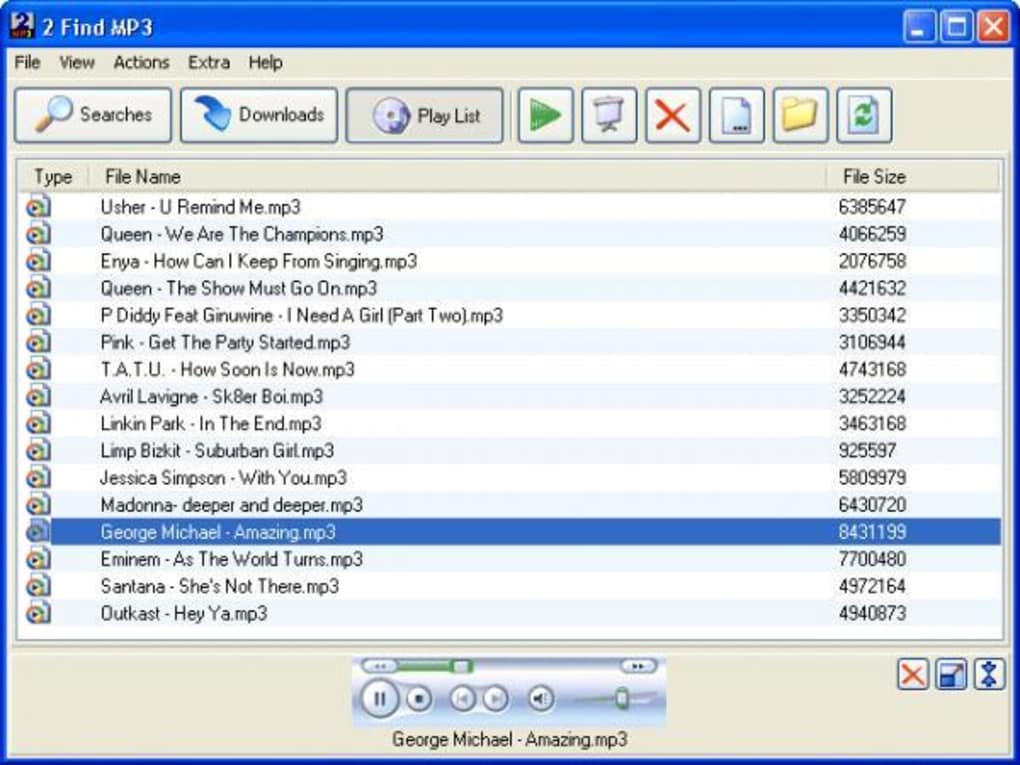
The workflow is intentionally frictionless. You launch the application, type the name of an artist, album, or track into the search field, and press Enter. Behind the scenes, 2 Find MP3 queries multiple public search engines and crawls known media repositories, consolidating the results into a clean list that displays the file name, source URL, file size, and estimated bitrate.
Users can preview the URL by right‑clicking for a quick check, then hit the “Download” button to start the transfer. Because the software does not act as a host or a torrent client, it never opens inbound ports or advertises your IP address to strangers, which is a notable security advantage over classic P2P solutions. However, it also means the program has no built‑in verification of copyright status, so the onus remains on the user to ensure that the download complies with local laws.
Installation, Usage & Compatibility
Installing 2 Find MP3 is a breeze for anyone familiar with standard Windows installers. After downloading the installer from the official site, run the .exe file and follow the on‑screen prompts: accept the license agreement, choose an installation folder (the default location works for most users), and click “Install.” The process completes in under a minute, and a desktop shortcut is created for quick access. For macOS users, a lightweight wrapper is available that runs the Windows executable via Wine, though performance may vary depending on the underlying system configuration. Linux enthusiasts can also employ Wine or a virtual machine to run the Windows version, but native support is not officially advertised.
Supported Operating Systems:
• Windows 7, 8, 10, 11 (64‑bit recommended)
• macOS 10.12+ (via Wine wrapper)
• Linux (via Wine or virtual machine)
Once installed, first‑time launch presents a clean window with a single search bar at the top. No registration or sign‑in is required, which aligns with the tool’s privacy‑first philosophy. To begin a search, simply type the desired keyword and press Enter.
Results populate in the central pane; each entry includes a clickable title, source URL, file size, and bitrate. If you wish to fine‑tune the results, click the “Filters” button to specify a minimum bitrate (e.g., 128 kbps) or a maximum file size (e.g., 10 MB). After selecting a track, click the “Download” button.
A standard Windows file‑save dialog appears, allowing you to choose a destination folder. The download proceeds in the background, and a progress bar updates in real time. Completed files are automatically added to your default music library if you have enabled that option in the settings panel.
The application also includes a modest “Settings” menu where you can toggle the secure HTTPS option, enable automatic duplicate detection, or change the default download path. For power users, an advanced mode reveals the raw source URLs, making it possible to copy the link into a download manager of your choice. Overall, the installation and usage experience is designed to be as straightforward as possible, minimizing the learning curve for users who simply want to locate free MP3s without diving into the complexities of torrent clients.
Pros, Cons & Frequently Asked Questions
Pros
- Lightweight and fast – consumes minimal system resources.
- No open ports or P2P networking, reducing exposure to security threats.
- Ad‑free interface with no bundled toolbars or unwanted software.
- Instant search results and one‑click download simplify the workflow.
- Built‑in duplicate detection helps keep your music library tidy.
Cons
- Limited catalogue for niche or independent artists – results can be sparse.
- Does not verify copyright status; users must ensure legal compliance.
- Native support only for Windows; macOS and Linux require Wine or a VM.
- Occasional broken links due to source servers removing files.
- No built‑in media player – users need a separate app to listen.
FAQ – Your Questions Answered
Is 2 Find MP3 legal to use?
The software itself is legal; it merely searches publicly accessible MP3 files. However, downloading copyrighted material without permission may violate local laws. Users should only download tracks that are in the public domain or released under a license that permits free distribution.
Does the program contain any adware or spyware?
No. Independent testing shows that 2 Find MP3 is clean, ad‑free, and does not install third‑party tracking components. The installer is straightforward, and there are no optional offers during setup.
Can I use 2 Find MP3 on macOS or Linux?
Officially, the application is built for Windows. macOS and Linux users can run it through Wine or a virtual machine, but performance may vary and some features (like native file dialogs) might not work perfectly.
What happens if a download link is broken?
Since the program pulls links from external servers, some URLs may become unavailable over time. In such cases, the download will fail, and the application will display an error message. Users can simply retry the search or choose an alternative source.
Is there a limit to how many files I can download?
No artificial limits are imposed by the software. The only constraints are your internet bandwidth, available disk space, and the number of valid links returned by the search engine.
Conclusion & Call to Action
2 Find MP3 fills a niche for users who prefer a lightweight, non‑P2P method of locating free MP3 files on the open web. Its strength lies in a clean, ad‑free interface, minimal system impact, and the peace of mind that comes from not exposing your computer to the traditional risks associated with peer‑to‑peer networks. However, the tool’s reliance on publicly indexed files means the catalog is uneven—mainstream hits appear quickly, while deep‑cut or independent releases may be missing altogether.
Moreover, the onus of legal compliance stays squarely on the user, as the software does not differentiate between public‑domain content and copyrighted material. If you’re comfortable navigating this gray area, appreciate a straightforward download experience, and primarily hunt for popular tracks that are already freely hosted, 2 Find MP3 can be a handy addition to your music‑collection toolkit. For those who demand a comprehensive library, strict legal guarantees, or native support across all major operating systems, a subscription‑based streaming service or a dedicated legal download store might be a better fit.
Ready to give it a try? Click the button below to download the latest version of 2 Find MP3, install it in seconds, and start exploring the freely available corners of the internet for your next favorite track.







